
Shiny hunting
Any wild Pokémon can be shiny. PBO does not publish shiny odds, but it gives you several tools that raise your chances for the Pokémon you want and keep you from losing one when it finally appears.
Your tools at a glance
Section titled “Your tools at a glance”| Tool | What it does | Where to get it |
|---|---|---|
 Shiny Tracker Shiny Tracker |
Boosts your shiny chance for one Pokémon you keep catching. | Any Poké Mart, 50,000 F |
| Membership | Raises your shiny chance while it is active. | Game Pass and membership |
 Shiny Charm Shiny Charm |
Raises the shiny chance of wild and chest Pokémon for everyone on the server, for 3 hours. | Donator Shop |
 Lure Lure |
Makes Rare and rarer Pokémon appear more often on a map for an hour. See Lures. | Dynite Ore Shop, Casino Token Store |
 Blaze Radar Blaze Radar |
Stops you from running from or knocking out a shiny by accident: it blocks the battle until you type a code. | Any Poké Mart, 3,000 F |
 Swarm Flute Swarm Flute |
Starts a Swarm, bringing special Pokémon to your map for an hour. | Donator Shop |
When a Shiny Charm is active, the server events panel shows that it is running and when it ends.
The Shiny Tracker
Section titled “The Shiny Tracker”The Shiny Tracker is the core of most hunts. It boosts your chance of finding one specific Pokémon shiny, and the boost grows every time you catch that Pokémon.
- Activate a tracker. Buy a Shiny Tracker from any Poké Mart and use it from your Bag (General items). Only one tracker can be active at a time.
- Catch the Pokémon you want to hunt. The first Pokémon you catch after activating the tracker becomes the tracked one: the game says, for example, “You are now tracking a Rare Magikarp for shiny.”
- Keep catching it. Each catch raises the tracker’s Shiny boost, up to a limit.
- Catch your shiny. The tracker is used up as soon as the shiny appears. If the shiny gets away or you knock it out, the tracker is gone, so a Blaze Radar is worth having.
The tracker follows the species and the rarity it started with. A  Magikarp that spawns as Rare is a different target from one that spawns as Common. Catching the other rarity does not raise the boost, and the boost only applies to the rarity you are tracking.
The tracker works on every kind of wild encounter: normal, swarm, roaming and chest Pokémon.
The Shiny Tracker window
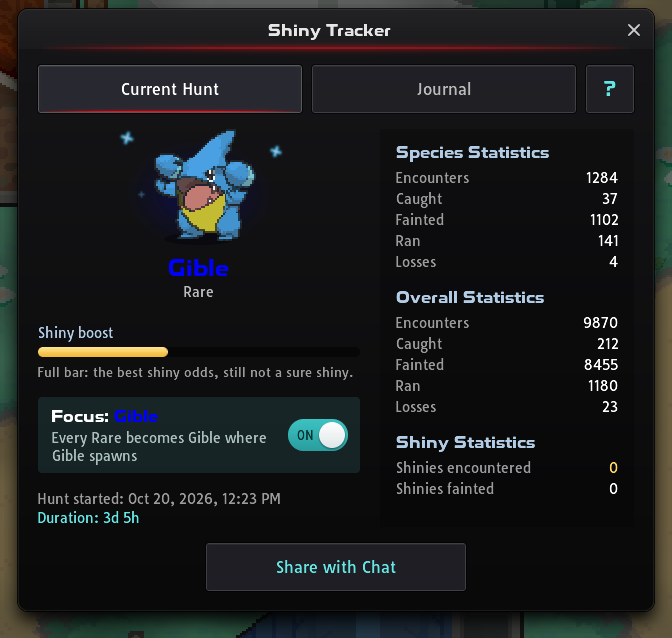
Section titled “The Shiny Tracker window”While a tracker is active, its icon sits in the active effects strip of the player panel. Press it to open the Shiny Tracker window. It has two tabs, plus a ? button that explains the tracker and Focus:
- Current Hunt: the tracked Pokémon and its rarity, the Shiny boost bar, the Focus switch, when the hunt started and how long it has run. Next to them are statistics for the tracked species, for every Pokémon in the hunt, and for shinies you met or knocked out along the way.
- Journal: your 20 most recent hunts, each marked Shiny Caught! or Tracker Broken, with its date, duration and statistics.
Share with Chat posts your current hunt or a journal entry so other players can view it.
How the boost grows
Section titled “How the boost grows”- From the first catch: every catch of your tracked Pokémon raises the boost, so your odds improve steadily through the whole hunt.
- Up to a limit: once the Shiny boost bar is full, more catches don’t raise it. Even a full bar never makes a shiny certain.
- Rarer Pokémon reach a bigger boost: a full bar does much more for a Legendary than for a Common Pokémon.
- Very long hunts: if you keep hunting an Ultra Rare or Legendary Pokémon long after its bar is full, its shiny odds get an extra boost. This only applies to wild encounters, not to Pokémon from chests.
Membership and a Shiny Charm raise your odds on top of the tracker.
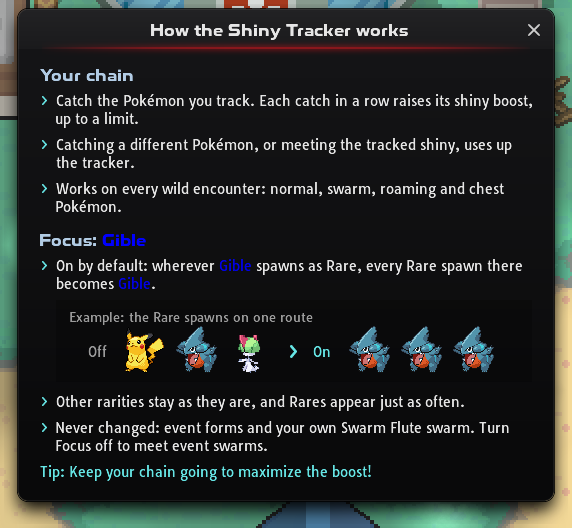
Once the tracker has its Pokémon, the Current Hunt tab shows a Focus row with an ON/OFF switch, for example “Focus: Gible”. Press anywhere on the row to switch it. Focus is on by default, and your choice carries over to your next trackers.
With Focus on, wherever your Pokémon spawns at its tracked rarity, every Pokémon of that rarity there appears as your Pokémon instead. This only changes your own encounters.
- Same place, same time: it only works where your Pokémon spawns at that rarity, at the same time of day and in the same kind of encounter (walking, surfing or fishing). Elsewhere, Pokémon of that rarity appear as usual.
- Same rarity only: other rarities stay as they are. Focus changes which Pokémon you meet, not how often its rarity appears.
- Never changed: event forms and a Swarm you started with your own Swarm Flute. Other Swarms change like any other spawn, so turn Focus off if you want to meet an event Swarm’s Pokémon.
- Off: every Pokémon spawns as it normally would.
Focus pairs well with Lures and, for Ultra Rare and Legendary targets, Luck Protection: they make your target’s rarity appear more often, and Focus turns those Pokémon into your target.
What breaks a tracker
Section titled “What breaks a tracker”Catching any other species breaks the tracker, and you lose it and its progress. These do not break it:
- Knocking out or running from Pokémon, including the one you are tracking.
- Catching your tracked species at a different rarity.
- Catching an event-form Pokémon.
- Catching Pokémon in the bug-catching and fishing competitions with their competition balls.
- During seasonal events, catching Pokémon on event maps with a Shiny Tracker Safe Poké Ball, Great Ball, Ultra Ball or Master Ball. Their protection only works on event maps while an event is running.
Focus doesn’t change these rules. Pokémon of other rarities still appear with Focus on, and catching one of them breaks the tracker. If you are about to throw a ball that would break your tracker, the game warns you first.
Lures and Luck Protection
Section titled “Lures and Luck Protection”Lures and Luck Protection don’t change shiny odds. They make rare Pokémon appear more often, so you meet Ultra Rare and Legendary Pokémon sooner. With Focus on, they also bring you your target more often.
A Lure makes Rare, Very Rare, Ultra Rare and Legendary Pokémon appear more often on the map where you use it, for every player there, for an hour.
- They stack: up to 3 Lures can run on one map at once, and each extra Lure makes the effect stronger.
- Premium Lure: a
 Premium Lure works like a Lure for these rarities and counts towards the same 3 per map.
 - Where they work: walking, surfing and fishing encounters, on any map with wild Pokémon except expedition maps.
- Where they run: press the Lures icon in the server events strip to see which maps have Lures and how many minutes each has left. The World Map marks them too.
- Where to get them: Lures cost 100 Dynite Ore at the Dynite Ore Shop or 540 Casino Tokens at the Casino Token Store, and can be rewards on the Game Pass Premium track, in the ranked ladder and in Dynamax Invasions. Premium Lures are sold in the Donator Shop.
Luck Protection
Section titled “Luck Protection”Luck Protection helps you find Ultra Rare and Legendary Pokémon. Press the Luck Protection icon in the top-right icon bar to see its two bars: one for Ultra Rare and one for Legendary Pokémon.
- Charging: wild Pokémon you meet on a map where that rarity can appear charge its bar. A Pokémon you knock out, or a battle you lose or tie, charges it more than a Pokémon you catch or run from. In a horde, every Pokémon counts.
- Half a bar: that rarity already appears more often.
- Full bar: it appears more often still. The window shows Full LP.
- Overcharge: after a full bar, more encounters fill an Overcharge bar in three steps (Overcharge I, Overcharge II and Maximum overcharge), and each step raises the boost again.
- Reset: meeting a Pokémon of that rarity resets its bar and its Overcharge, even if you run.
- Chest Pokémon: Pokémon from chests neither charge a bar nor reset it.
A boost never guarantees a find. How it works in the window sums up these rules.
Hunt history, the other button in the window, has an Ultra Rare tab and a Legendary tab:
- Current streak: how many encounters you have had without that rarity. Each wild Pokémon counts once, horde members included; chest Pokémon don’t count.
- Finds: every Pokémon of that rarity you have found, with how many encounters it took, where it was and what happened to it, such as Caught or Got away.
- Share with Chat: posts your streak or a find to chat.
The Blaze Radar
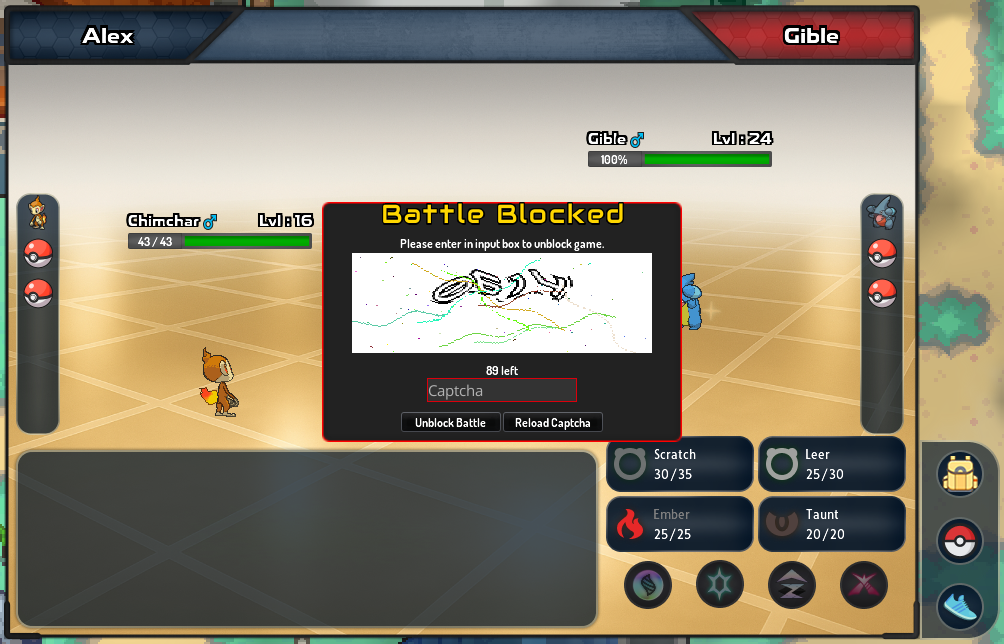
Section titled “The Blaze Radar”The Blaze Radar watches your encounters. When it reacts to a Pokémon, a Battle Blocked window stops the battle until you type the code it shows and press Unblock Battle, so a misclick cannot run away from it or knock it out.
| Radar | Reacts to | How long it lasts |
|---|---|---|
| Blaze Radar |
Ultra Rare, Legendary or shiny Pokémon | 3,000 encounters, or until it triggers |
Encounters left, co-op and hordes
Section titled “Encounters left, co-op and hordes”- Encounters left: while a radar is active, its icon sits in the active effects strip of the player panel. Press it to see how many encounters the radar has left. You can’t use a second radar until the first one ends.
- Hordes: the radar checks every Pokémon in a horde, and the whole horde counts as one encounter.
- Co-op battles: each player’s own radar watches the Pokémon assigned to them. If either radar reacts, the battle is blocked for both players.
- Pokémon chests: for a Pokémon from a chest, the radar only reacts if it is shiny.
- After it is used up: when a radar reacts or runs out during a battle and you have another one in your Bag, the game offers to apply it when the battle ends.
Swarms
Section titled “Swarms”A Swarm is a timed map event: for its duration, specific Pokémon appear on that map, some of which you cannot find anywhere else. Swarms also make hordes more likely there for walking, fishing and surfing encounters.
Swarms start in three ways:
- Automatically, from time to time, on a random map in Sinnoh, Jvaloh or Hoenn.
- After a Dynamax Invasion ends.
- With a Swarm Flute: use it on the map you want. It starts a 1-hour Swarm there, if that map supports Swarms. Using a flute also counts towards your Goodwill Tokens.
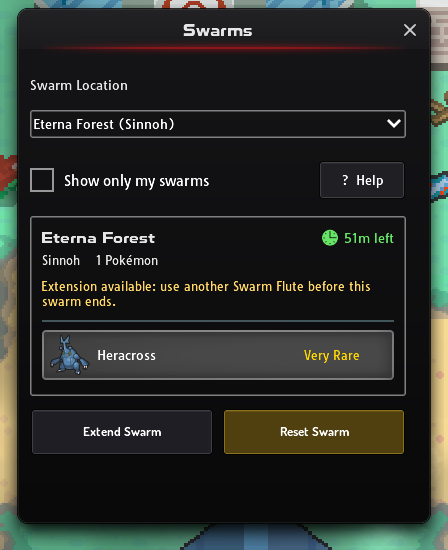
Open the Swarms panel from the icon on the right of the screen to see every active Swarm, its map and the Pokémon in it. Hovering over the Swarm icon shows when it ends, and Swarm maps are marked on your world map.
Managing your own Swarm
Section titled “Managing your own Swarm”If you started the Swarm yourself, you can manage it from the Swarms panel:
| Action | When | What it does |
|---|---|---|
| Reset | Up to 3 times | Rolls different Pokémon. The remaining time stays the same. |
| Extend | In the Swarm’s last 10 minutes, with a second Swarm Flute | Adds another hour. You can keep extending, but an extended Swarm can no longer be reset. |
| Cancel | Once it has been extended or you have used all 3 resets | Ends the Swarm. |
After the hunt
Section titled “After the hunt”- Wild shiny Pokémon always have at least 15 in every IV. Shiny Pokémon also have higher IV Potion limits and their own IV Randomizer pity table.
- Catching or knocking out a shiny earns Shiny Coins, which you can spend at the Shiny Coin Store in Hearthome City.
- Unwanted shinies can be turned into IV Potions at the IV Scientists in Prof. Rowan’s Lab or with Extract IV Potion in the PC.

