Pokémon cards and card styles
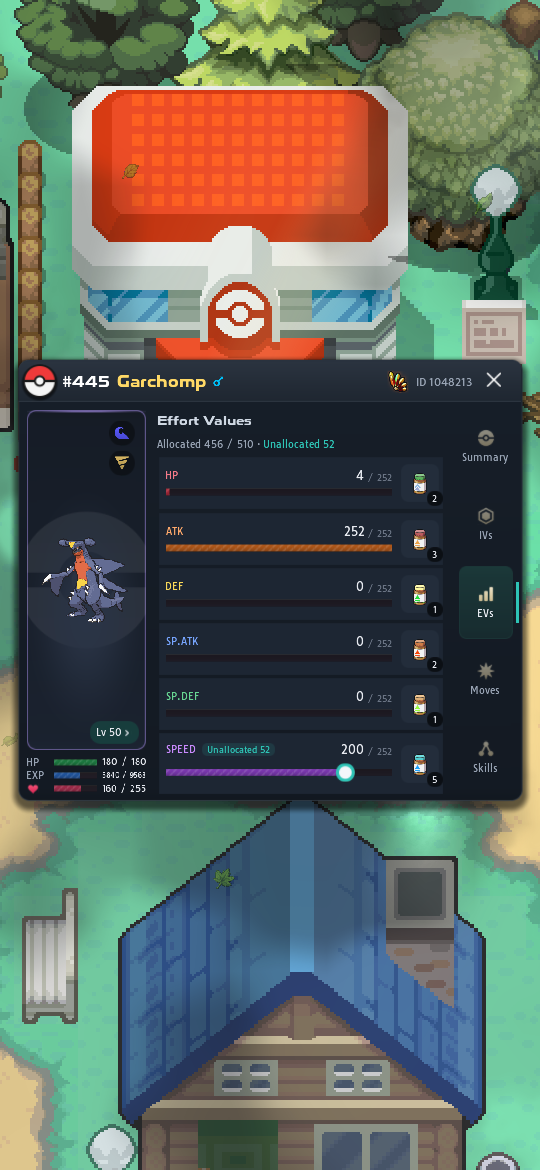
Every Pokémon in your party has a card: one window with its stats, IVs, EVs, moves and skills, where you also train it. A card can wear a card style, an animated look you earn by playing or buy. Other players see your styles on the Pokémon you share in chat.
Opening the card
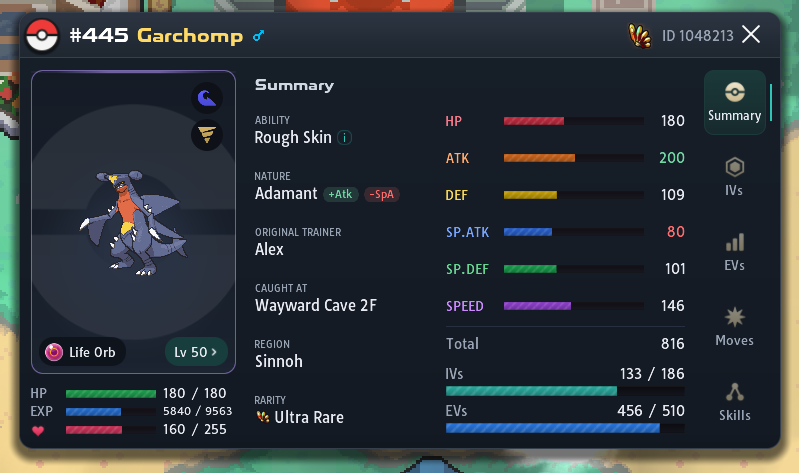
Section titled “Opening the card”Click a Pokémon in your party, on the left of the screen, to open its card. Click it again to close it. Each party Pokémon has its own card, so you can have several open at once. You can’t open one during a battle.
Right-click a party Pokémon (long-press on a phone) for a short menu: Summary also opens the card, Walk with me makes it your follower, and Card style opens the Card style picker for that Pokémon.
Pokémon outside your party
Section titled “Pokémon outside your party”Pokémon in your PC, in chat and in other windows show a read-only card. It has the same look but no tabs, and nothing on it can be changed. It shows the stats with their base, IV, EV and unallocated EV columns, the moves, the ability and nature, the region it was caught in, and how many IV Potions and IV Randomizers it has had. Its Lv chip shows its skills.
| Where | How to open it |
|---|---|
| PC | Summary in the Pokémon’s menu or the Selected Pokémon panel, or click a Pokémon in Current Party |
| Chat | Rest the mouse on a shared Pokémon, or click it to open the card as a window |
| Trades, the Trade House, crew storage and team presets | Point at or open the Pokémon there |
To train a Pokémon, put it in your party and open its full card.
What the card shows
Section titled “What the card shows”The card has three parts:
- Title bar: the Pokédex number, name and gender, the rarity mark and the Pokémon’s ID. The emblem on the left opens the Card style picker.
- The picture: the Pokémon with its types, its held item and a Lv chip. Under it are its HP, its EXP (now and needed for the next level) and its happiness out of 255.
- The tabs, down the right side:
| Tab | What it shows |
|---|---|
| Summary | Ability, nature, original trainer, where and in which region it was caught, and rarity. Beside them, the six stats with their total, and the IV and EV totals (out of 186 and 510). |
| IVs | The six IVs, their total and how many are perfect, the IV Potions used out of the Pokémon’s limit, and the IV Randomizers used on it. |
| EVs | Each stat’s allocated EVs out of 252, its unallocated EVs, and the total out of 510. |
| Moves | The four moves with their type, category and PP, and the PP items in your Bag. |
| Skills | Skill Points, resets and every Pokémon Skill it can learn. |
On the Summary tab, the nature shows the stat it raises and the one it lowers, and those two stats show in green and red. Press the ability to read what it does. Press the IV or EV total to open that tab.
What you can do from the card
Section titled “What you can do from the card”| To | Do this | More |
|---|---|---|
| Allocate EVs | On EVs, slide a stat’s bar over its unallocated EVs, then press Apply | Allocated and unallocated EVs |
| Use a vitamin | On EVs, press the vitamin at the end of the stat’s row | Changing EVs |
| Use an IV Potion or IV Toxin | On IVs, pick a stat, then press +1 IV or -1 IV | The three IV items |
| Swap in a move from the Move Bank | On Moves, press a move | The skills |
| Change the order of the moves | On Moves, drag a move by its handle | — |
| Restore or raise PP | On Moves, press a PP item, then the move | — |
| Take off the held item | Press the item on the picture, then confirm | — |
| Reset at level 100 or upgrade a skill | Open Skills, or press the Lv chip | Resetting and upgrading |
| Change the card’s look | Press the emblem | Card styles |
The PP items are the  Ether,
  Max Ether,
  Leppa Berry,
  Elixir,
  Max Elixir,
  PP Up and
  PP Max. An Elixir restores every move, so it doesn’t ask for one.
Card styles
Section titled “Card styles”A card style changes how a Pokémon’s card looks: its colors, its art and a short animation. Styles don’t change anything in battle.
- Slate is the default style, and everyone has it.
- A style you unlock is yours for good, on any of your Pokémon. Styles are not items: you can’t trade or sell them.
- Your default style dresses every Pokémon that has no style of its own. You can give any party Pokémon its own style.
- Other players see your styles only when you share a Pokémon in chat. Its card shows the Pokémon’s own style, or else your default.
- A shared Pokémon wearing a style you don’t own has a Card style line on its card. Press it to see that style in your own picker.
Choosing a style
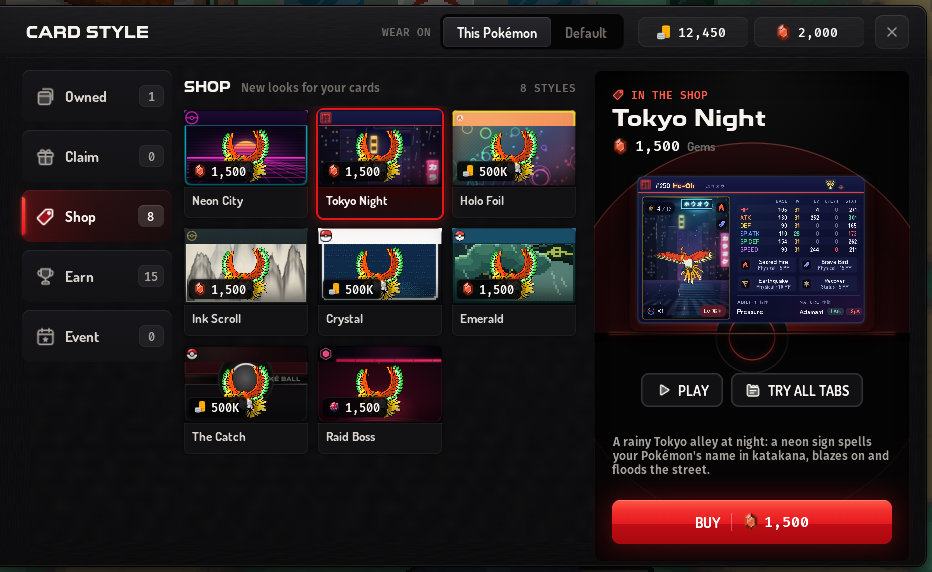
Section titled “Choosing a style”- Open the picker. Open a party Pokémon’s card and press the emblem in its top-left corner. Some styles show a Poké Ball there instead; press that. You can also right-click the Pokémon in your party (long-press on a phone) and choose Card style.
- Choose who wears it. Next to Wear on, pick This Pokémon for this one only, or Default for every Pokémon without a style of its own.
- Find a style. The lists on the left are Owned, Claim, Shop, Earn and Event, each with its count. Press a style to see it on the large preview.
- Put it on. Press Equip.
To take a Pokémon’s own style off, open the picker on This Pokémon and press Use default.
A Pokémon loses its own style when it changes hands: in a trade, on the Trade House or in crew storage. The style itself stays yours.
Other ways in
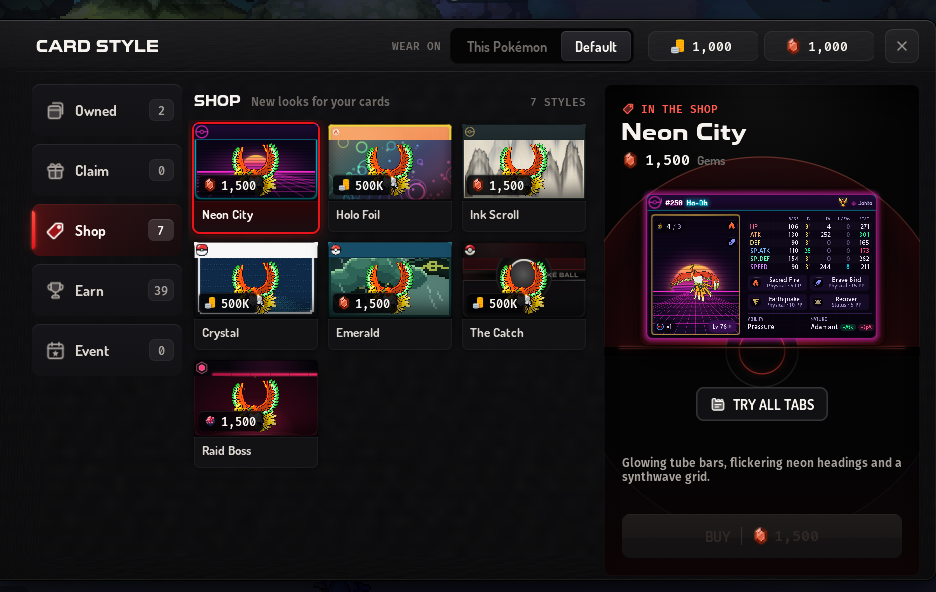
Section titled “Other ways in”Some other windows open the picker on its own, over the window you were in. It then starts on Default, and This Pokémon means the first Pokémon in your party, so you need at least one Pokémon in your party. Closing the picker takes you back to that window.
| Where | The picker opens on |
|---|---|
| A style on the Card Styles tab of the Donator Shop | That style |
| All styles on the same tab | Your default style |
| A card style milestone in the Fishing or Mining window (“Card style · tap to see it”) | That style |
| Claim on an achievement that gives a style, in the Achievements window | That style |
| The Card style line on a Pokémon shared in chat | That style |
Getting a style
Section titled “Getting a style”- Earned styles: once you qualify, the style waits in the Claim list and the game tells you it is ready. Open the picker and press Claim. Progress you made before card styles came out counts too.
- Shop styles: press Buy. The price is on the button, in Gems, money or Dynite Ore. If you don’t have enough, the button is grayed out.
- Locked styles: the Earn list shows what each one needs. For a count or a level, a bar shows how far you are, such as 412 / 500 Pokémon seen.
- Ticket styles: use the style’s ticket from your Bag, or press Use a ticket in the picker. The ticket is used up. See unlocked with a ticket.
A style you buy or claim goes on at once, on this Pokémon or as your default, whichever Wear on shows. Styles are bought in the picker itself, even when you open it from the Donator Shop.
Trying a style
Section titled “Trying a style”Every tile and the large preview show the style on a stand-in  Ho-Oh, so you can look at styles you don’t own yet.
- Play plays the style’s animation on the preview, at full size.
- Try all tabs opens a whole card in the style, on the stand-in. Every tab works, but nothing you press there changes anything. In chat shows the card as other players would see it in chat.
Animations
Section titled “Animations”A style’s animation plays once when the card opens on the Summary tab, and once when someone opens your Pokémon in chat. After that, the style keeps only its gentle background motion. Press the Pokémon’s picture to play the animation again.
To turn the animations off, set Settings → Interface → Card Style Animations to Off. The default is Once.
The Slate style takes the color you pick in Accent Tint in the same settings (called Dialog Tint on the older dialog styles); see Interface. Other styles keep their own colors.
All card styles
Section titled “All card styles”Earned by playing
Section titled “Earned by playing”| Style | How to earn it | What it shows |
|---|---|---|
| Kanto Hall of Fame | Beat the Kanto Elite Four and Champion | A Kanto League champion’s card |
| Hoenn Hall of Fame | Beat the Hoenn Elite Four and Champion | A Hoenn League champion’s card |
| Sinnoh Hall of Fame | Beat the Sinnoh Elite Four and Champion | A Sinnoh League champion’s card |
| Jvaloh Hall of Fame | Beat the Jvaloh Elite Four, up to Sheta | A Jvaloh League champion’s card |
| Snap | See 500 different Pokémon in your Pokédex | A camera focuses, snaps and grades a photo |
| AR Catch | See 750 different Pokémon in your Pokédex | A phone camera’s catch in a sunny park |
| Who’s That Pokémon? | See 1,000 different Pokémon in your Pokédex | The anime’s quiz break, silhouette first |
| Deep Line | Reach fishing level 250 | An old dock at dusk and a shadow under the water |
| Magma Vein | Reach mining level 500 | A mine wall cracking open with magma |
| Pokémon Center | Defeat 1,000,000 wild Pokémon | The healing machine under the red roof |
| Wild Encounter | Defeat 5,000,000 wild Pokémon | A classic wild battle intro |
| Damage Leaderboard | Deal 25,000,000 damage in total in Dynamax Invasions | Your row climbing a live damage leaderboard |
The wild Pokémon and damage counts are your all-time totals. The Big Not-So Friendly Giant achievement asks for the same damage total and shows the Damage Leaderboard style; see rewards and the card style.
Bought in the picker
Section titled “Bought in the picker”| Style | Price | What it shows |
|---|---|---|
| Neon City | 1,500 Gems | Neon tube bars and a synthwave grid |
| Tokyo Night | 1,500 Gems | A rainy alley where a neon sign spells your Pokémon’s name |
| Ink Scroll | 1,500 Gems | An ink painting on a scroll, with your Pokémon’s name brushed in Chinese |
| Emerald | 1,500 Gems | A storm over Sootopolis with  Rayquaza in the clouds Rayquaza in the clouds |
| Holo Foil | 500,000 F | A rainbow sliding over a holo rare card |
| Crystal | 500,000 F | Pokémon Crystal’s status screen, with  Suicune running behind Suicune running behind |
| The Catch | 500,000 F | Your Pokémon drawn into a Poké Ball that wobbles and clicks |
| Raid Boss | 1,500  Dynite Ore Dynite Ore |
A giant boss bursting out of the card |
Dynite Ore comes from Dynamax Invasions. For Gems, see the Donator Shop: its Card Styles tab shows the four Gem styles and opens the picker on them.
Unlocked with a ticket
Section titled “Unlocked with a ticket”These styles are never sold. Each one is unlocked with its own ticket, an item you use from your Bag.
| Style | Ticket from | What it shows |
|---|---|---|
| Game Corner | The Make It Rain Chest from the Casino Token Store | A Game Corner slot cabinet: the reels stop, the bulbs flash and coins spill over your Pokémon |
| Voltorb Flip | The Make It Rain Chest | A Voltorb Flip board: cards flip, the coins multiply, then a Voltorb goes off |
| Particle Snap | OU ranks 1–10 at the monthly ladder resets of the October to December 2026 season; see monthly prizes | Obsidian glass that bursts into glowing particles, swirls into a galaxy and flies back |
In the picker these styles wait in the Earn list until you use a ticket. Tickets are ordinary items you can trade or sell. If you already own the style, the ticket stays in your Bag.
On a phone or tablet
Section titled “On a phone or tablet”The Android and iOS apps and phone browsers use a phone layout.
| What | On a computer | On a phone |
|---|---|---|
| Open a card | Click the Pokémon in your party | Tap it |
| Party Pokémon’s menu | Right-click it | Long-press it |
| The card | A window you can move | Fills the screen, with larger buttons |
| Held item | Its icon and name | Its icon |
| Card style picker | A large window | Fills the screen |