
Crews and Crew Wars
A crew is PBO’s guild: a group of players with a shared chat, a crew level, skills, storage and a logo. Crews compete 7 times a week in Crew Wars, a 45-minute PvP event where crews fight each other and hold a legendary base for points.
Join or create a crew
Section titled “Join or create a crew”- Join: you need at least 1 badge and no crew, and you must be online when the invite comes. The leader and commanders invite players by username or PBO ID with Invite in the Crew Hall, or with Crew Invite in a player’s chat menu. To find a crew, ask in the in-game chat or the crew recruitment channel on the PBO Discord.
- Create: press the crew button in the top-left panel while you have no crew to open Create a crew. You need 3 badges and 10,000 F. The name must start with a letter, use only letters and numbers (no spaces), be at least 3 characters long and have no blocked words. If the name is taken, the window says so and keeps what you typed. Once the crew is made, its Crew Hall opens.
A new crew has room for 10 members and one commander, and starts at level 0. New members join as grunts. Each member has one of three roles:
| Role | What they can do |
|---|---|
| Leader | Everything a commander can, and manages commanders too. Only the leader changes roles: makes grunts commanders, commanders grunts, and another member the leader. |
| Commander | Invites players, edits the crew notice and logo, spends skill points and uses all of crew storage. Manages grunts: their storage access, and removing them from the crew. |
| Grunt | Uses the parts of crew storage that the leader or a commander gave them access to. |
The Crew Hall
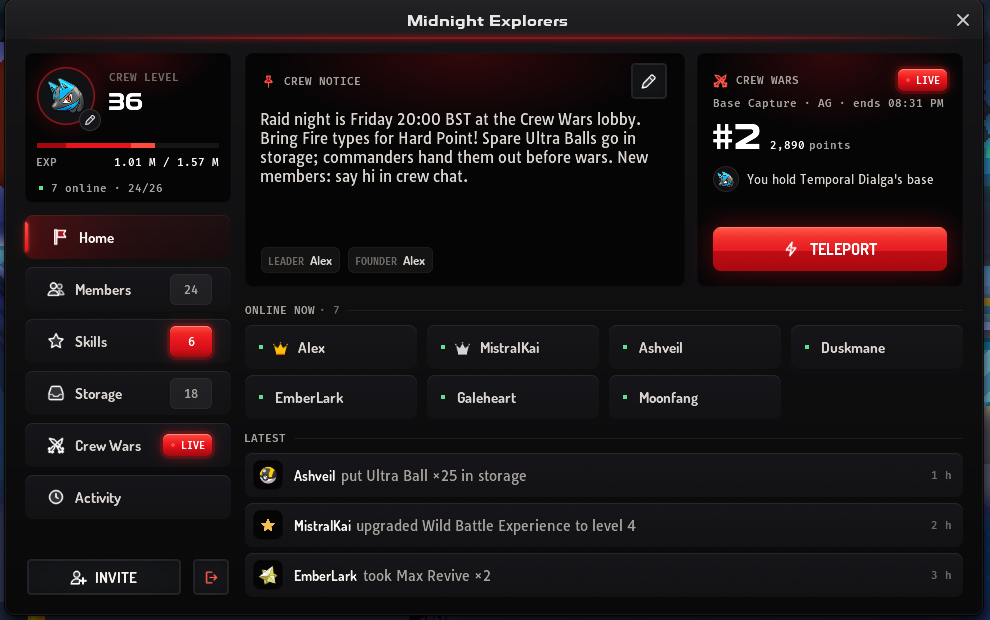
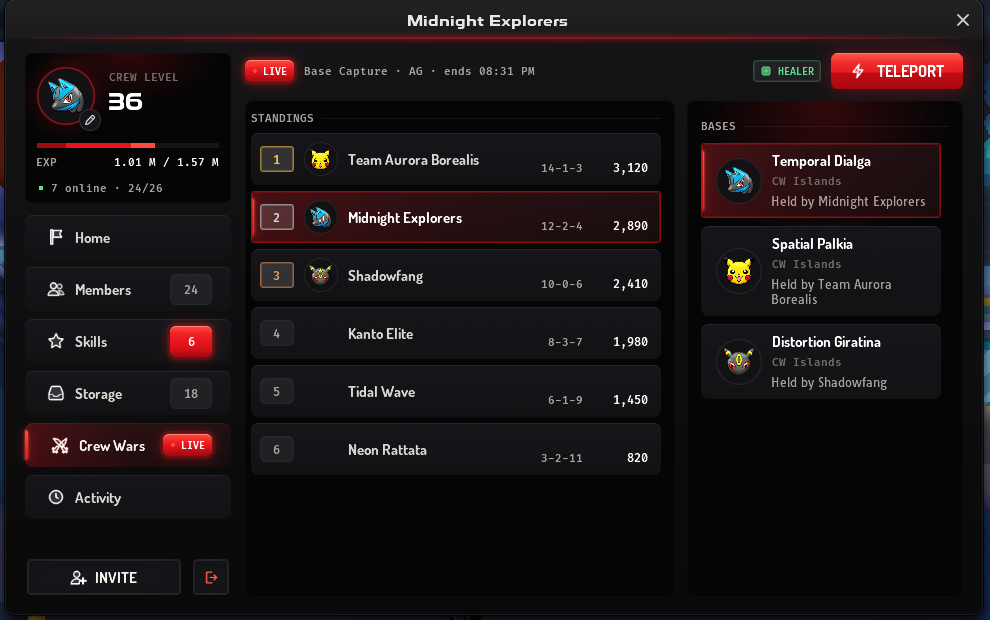
Section titled “The Crew Hall”The crew button in the top-left panel opens the Crew Hall, your crew’s window. It is titled with your crew’s name and has six pages:
- Home: the crew notice, a Crew Wars panel with Teleport, the members online now and the latest activity. Press an online member to open them in Members, or a line of activity to open Activity.
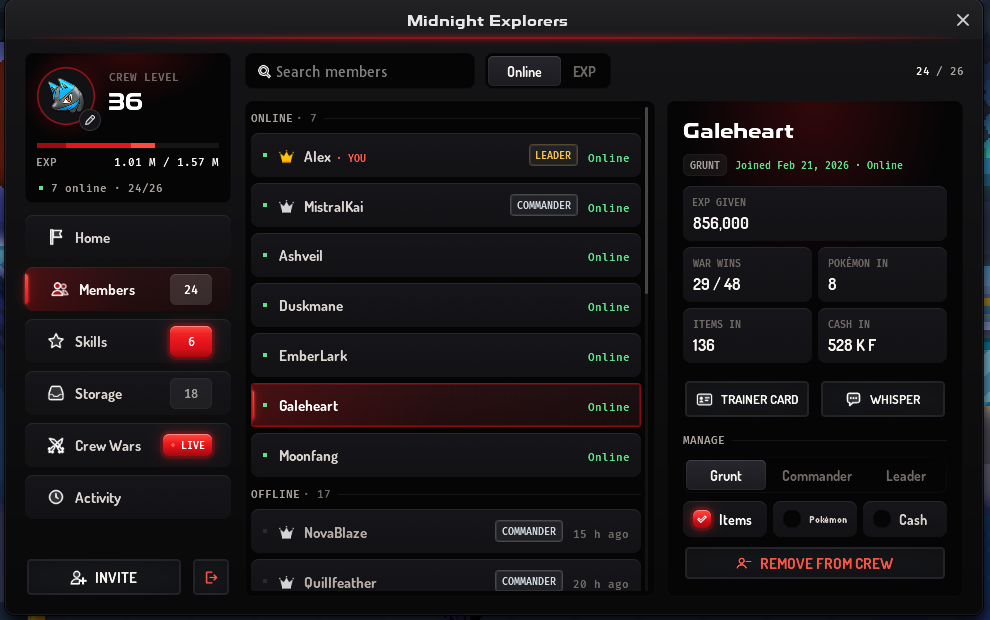
- Members: everyone in the crew, sorted by Online (online members first) or EXP (the EXP each gave the crew), with a search. Press a member to see their role, when they joined and were last online, the EXP they gave, their war wins, and the Pokémon, items and cash they put in storage. Their Trainer Card button is greyed while they are offline, and Whisper starts a private message to them.
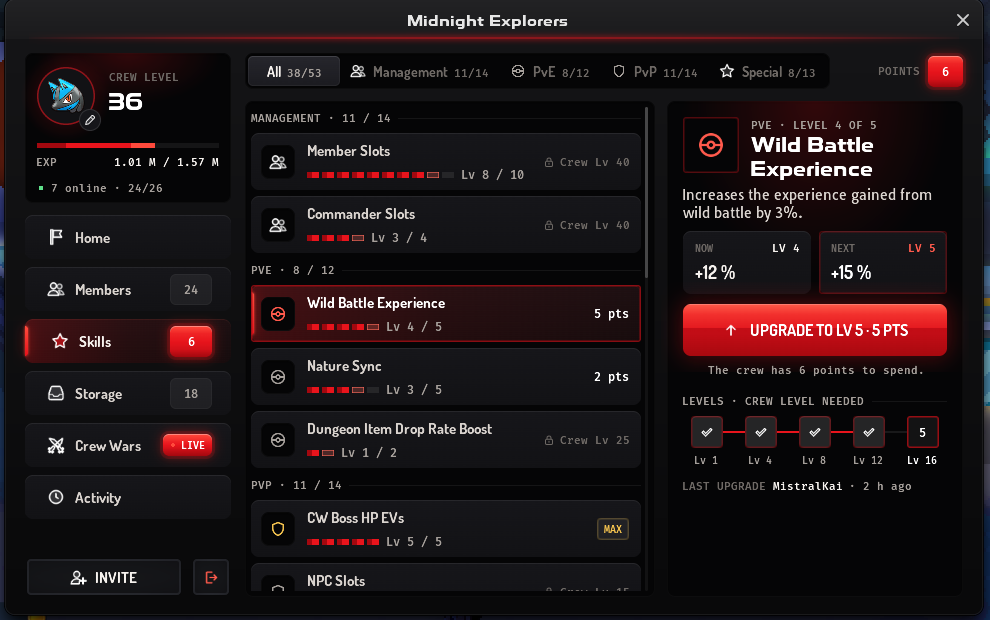
- Skills: the crew’s 20 skills and its skill points. See crew levels and skills.
- Storage: the crew’s shared Pokémon, Items and Cash. See crew storage.
- Crew Wars: while a Crew War runs, its format, tier and end time, the Standings (each crew’s wins, ties, losses and points) and the Bases with the crew that holds each. Teleport is here too, war or not.
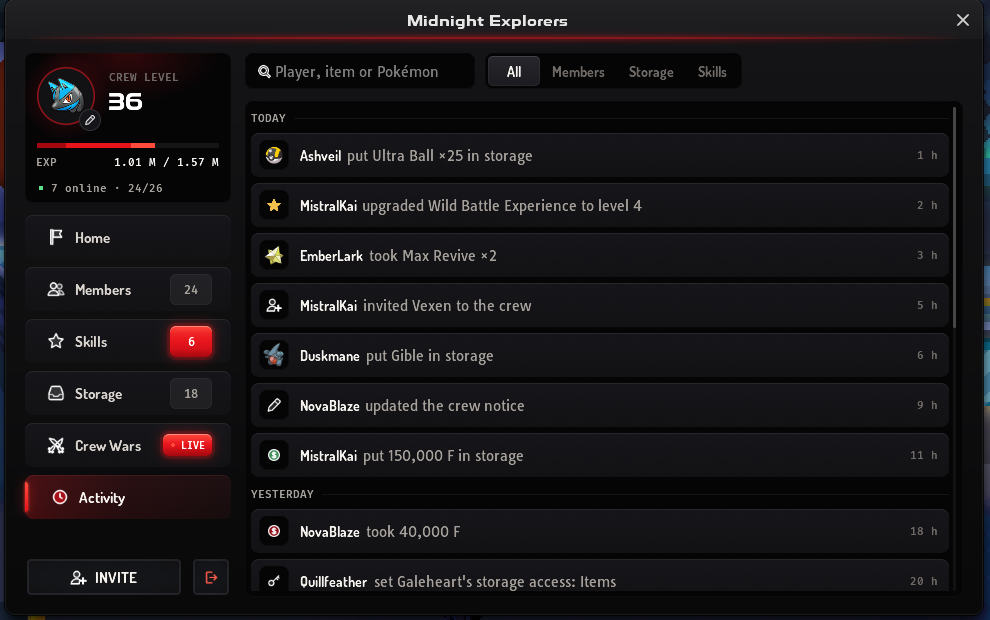
- Activity: the crew log and the storage log in one list, newest first and grouped by day. Filter it to Members, Storage or Skills, or search it for a player, item or Pokémon.
On a computer, the pages are tabs down a rail on the left. Above them are the crew’s logo, its level and EXP bar, and how many members are online. The tabs show the member count, the crew’s skill points, how many Pokémon and items are stored, and LIVE during a Crew War. Invite (for the leader and commanders) and Leave are at the bottom of the rail.
On a phone, the six pages are icons across the top, next to the page’s own buttons. Hold an icon to see its name. The Skills icon shows the points left to spend (for the leader and commanders), and the Crew Wars icon has a red dot during a war. Home’s top row has the logo, the level and EXP bar, Invite and Leave.
The leader and commanders change the crew’s look from Home:
- Crew logo: press the logo (it has a pen on it). Pick one from Basic, Crew Shop (needs the Crew Logo skill) or Premium, then press Use this logo. The logo shows next to members’ names and on the Crew Wars scoreboard.
- Crew notice: press the pen on the notice, write up to 500 characters, then press Save.
Managing members
Section titled “Managing members”On Members, press a member you can manage and the Manage part shows under their details. On a phone, press Manage to open it over the window. The leader manages every other member; a commander manages grunts.
- Role: Grunt, Commander or Leader. Only the leader changes it. The Commander Slots skill sets how many commanders the crew can have.
- Storage access: tick Items, Pokémon or Cash for a grunt. The leader and commanders always have all three.
- Remove from crew: asks first, then takes them out of the crew and its chat.
Making another member the leader turns you into a grunt with no storage access. A commander who is made a grunt loses their storage access too.
Leave asks first, and you lose your crew contribution numbers. The leader can only leave after making someone else the leader. A leader who is the crew’s last member deletes the crew by leaving.
Crew storage
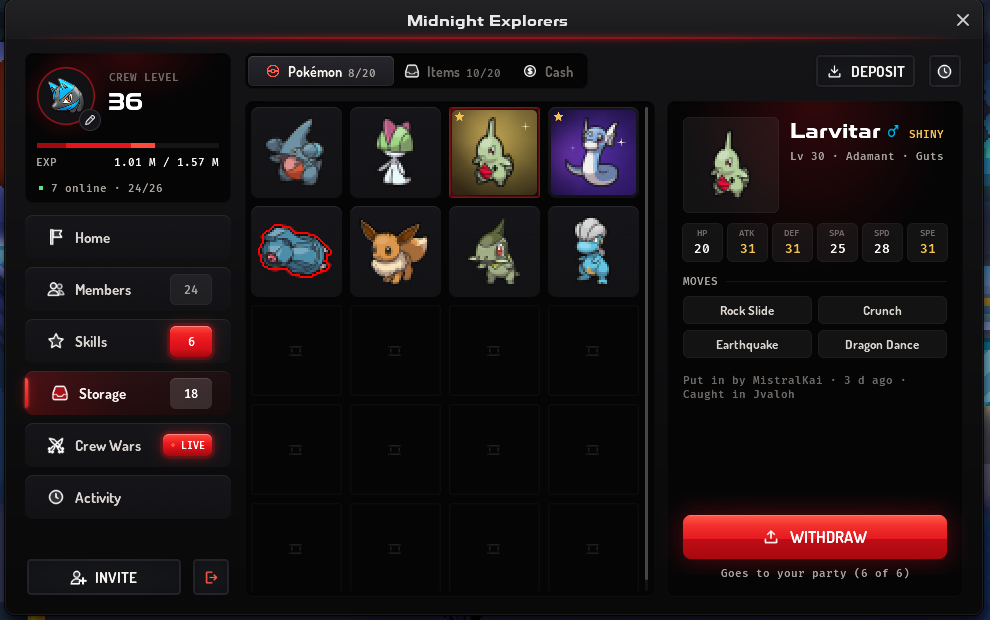
Section titled “Crew storage”Storage holds the crew’s shared Pokémon, items and money. Switch between Pokémon, Items and Cash at the top, where each shows how full it is.
- Room: a new crew’s storage has no room. The Pokemon Storage Slots, Item Storage Slots and Max Storage Cash skills add it.
- Taking out: press a Pokémon or item to see its details, then press Withdraw. For items, choose the amount first. A Pokémon goes to your party, so you need a free slot.
- Putting in: Deposit opens your party or your Bag. One Pokémon always stays in your party. For money, type an amount and press Deposit or Withdraw.
- Access: without access to a part, its buttons are off and the page tells you to ask a leader.
- Rules: storage follows the Trade House rules. What you can’t list there can’t go in, and you can’t take out a Pokémon above your trade level cap.
- Where: storage doesn’t work on the Crew Wars base maps or in the Uxie, Mesprit and Azelf Labyrinths and Caverns.
- Log: the clock button opens the storage lines in Activity.
Teleport to the Crew Wars Lobby
Section titled “Teleport to the Crew Wars Lobby”Once your crew has the Crew Wars Fast Teleport skill, Teleport on Home and on the Crew Wars page takes you to the Crew Wars Lobby at any time, with or without a Crew War on. Without the skill the button is locked: hold it to see which skill unlocks it.
Crew levels and skills
Section titled “Crew levels and skills”Crews level up from 0 to 50. Members earn crew experience whenever they gain experience in battle, and the crew gets a bonus for placing in Crew Wars (more for first, second and third). Every level gives 3 skill points.
The Crew Hall’s Skills page lists the crew’s 20 skills in four branches: Management, PvE, PvP and Special. Each row shows the skill’s level, and its cost in points, MAX, or the crew level it needs. Press a skill to see what it does, what its current and next levels give (Now and Next), the crew level each of its levels needs, and who upgraded it last.
The leader and commanders spend the points with the upgrade button under Now and Next (for example Upgrade to Lv 5 · 5 pts), which asks first. When a skill can’t be bought yet, the reason shows under the button. Grunts see the skills but can’t upgrade them.
The main skills:
| Skill | Effect | Range |
|---|---|---|
| Member Slots | +2 members per step | 10–30 members |
| Commander Slots | More commanders | 1–4 commanders |
| Wild Battle Experience | +3% experience from wild battles per step | Up to +15% |
| Nature Sync | Better nature syncing for Synchronize leads | 5 steps |
| CW Boss HP EVs | Extra HP for the base boss while your crew defends it | 5 steps |
| Crew Wars Healer | Healer NPCs for your crew on the Crew Wars maps | Crew level 10 |
| Crew Wars Fast Teleport | Teleport to the Crew Wars Lobby from the Crew Hall, any time | Crew level 10 |
| Crew Logo | The Crew Shop logos in the logo picker | Crew level 5 |
| Pokemon Storage Slots | Room for Pokémon in crew storage | None, then 10, 20, 25 and 30 |
| Item Storage Slots | Room for items in crew storage | None, then 10, 20, 25 and 30 |
| Max Storage Cash | Most money crew storage holds | None, then 1,000,000 and 2,000,000 F |
Crew Wars
Section titled “Crew Wars”Each Crew War is played in either OverUsed (OU) or UnderUsed (UU):
| Day | Time (UTC) | Tier |
|---|---|---|
| Monday | 16:00 | UU |
| Wednesday | 10:00 | UU |
| Wednesday | 20:00 | OU |
| Thursday | 20:00 | UU |
| Saturday | 03:00 | OU |
| Sunday | 01:00 | OU |
| Sunday | 18:00 | OU |
- Seasonal events: during the Halloween, Easter and Christmas events some start times move 1 hour earlier.
- Announcements: the game announces each Crew War 5 minutes before it starts, with its tier, and the Events button shows the countdown.
- Battle rules: battles follow the same clauses and bans as ranked OU or UU, with every Pokémon scaled to level 100.
Who can fight
Section titled “Who can fight”- You must have been in your crew for at least 72 hours.
- Each crew can field up to 20 different members per Crew War.
- Your party must pass the clauses of that Crew War’s tier before you can leave the lobby.
Getting there
Section titled “Getting there”
- Take the teleporter. Talk to the teleporter in Hearthome City and choose the Crew Wars Lobby (1 F, needs 3 badges). If your crew has the Crew Wars Fast Teleport skill, press Teleport in the Crew Hall instead; see Teleport to the Crew Wars Lobby.
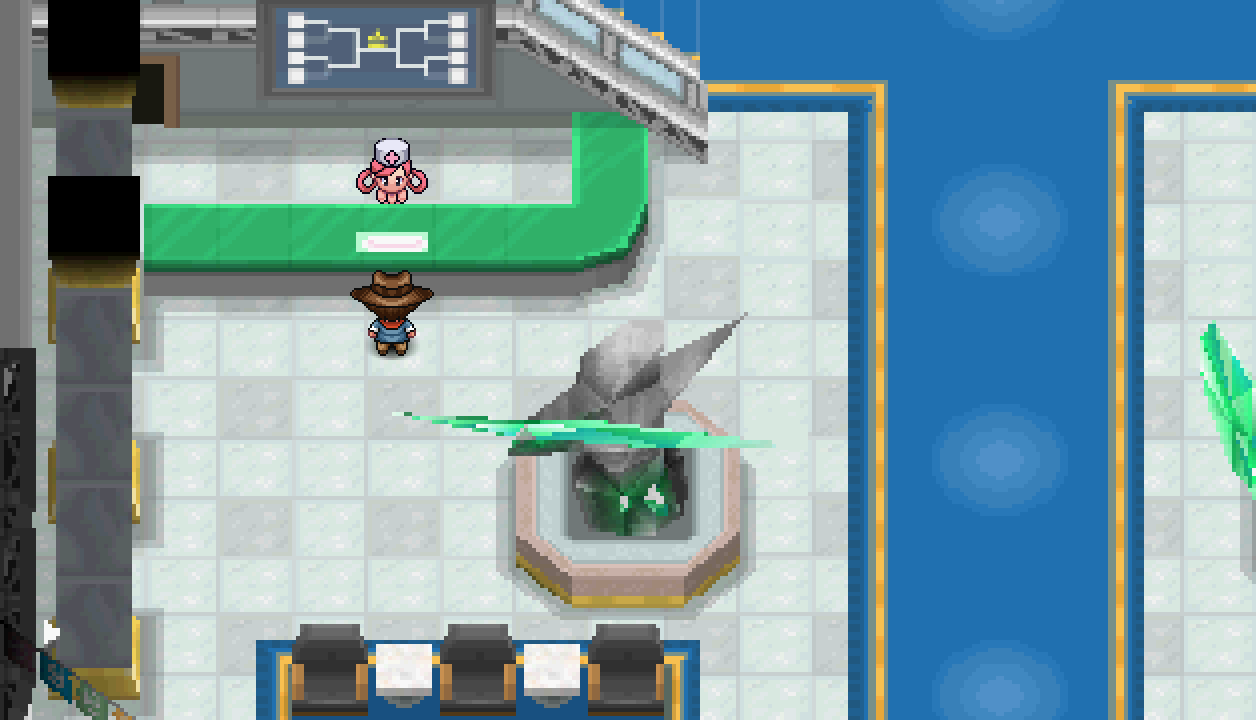
- Get ready in the lobby. The lobby has a Nurse Joy, a PC, an ATM and a teleporter back to the regions. Battles you start here by clicking another player are scaled to level 100, so it is a good place to test teams.
- Walk to the bases. While a Crew War is running, walk from the lobby to the three base maps: Temporal Dialga, Spatial Palkia and Distortion Giratina.
How a Crew War works
Section titled “How a Crew War works”- The base: one of the three bases is active. Its legendary boss (
 Dialga,
  Palkia or
  Giratina) is the base: beat it to capture the base for your crew. The boss is at least as high a level as your strongest Pokémon, and while a crew holds the base its boss gains extra HP from that crew’s skill.
 - Capturing: when a base is captured, players from other crews on that base are sent back to their last healing spot, and the capturing crew is moved next to the boss.
- Defending: defenders block the path with special tiles that only one player can stand on, so attackers must beat them in PvP to get through. Click another player and choose battle to fight them.
- Healing: attackers (any crew not holding the base) are fully healed after every PvP win on the active base. Defenders are not, so they rely on healer NPCs (crew skill) and items. Losing sends you back to your last heal point, which can be the lobby nurse.
- Hidden names: while a Crew War runs, players from other crews on the base maps show as Missing, and their trainer cards hide their name and PBO ID.


Each Crew War randomly uses one of two modes:
| Mode | Active base |
|---|---|
| Base Capture | The same base for all 45 minutes |
| Base Capture (Hard Point) | A new active base is picked every 11 minutes, and everyone on the old base is sent back to the lobby |
Points
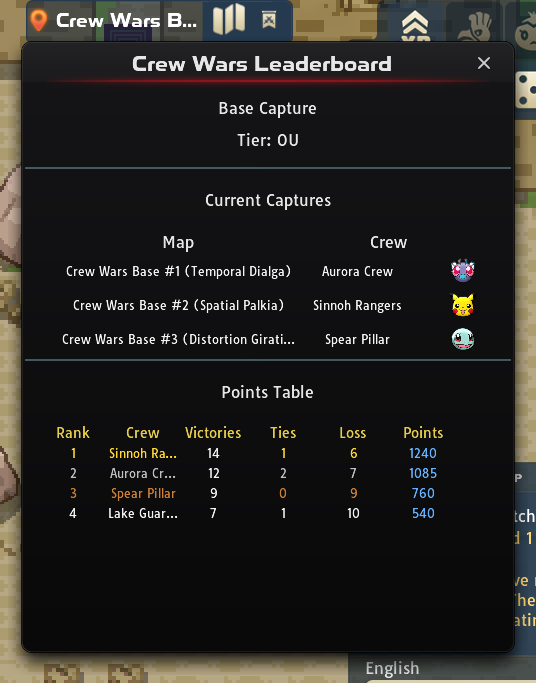
Section titled “Points”| Action | Points |
|---|---|
| Win a PvP battle while your crew holds the base | 3 |
| Win a PvP battle otherwise | 1 |
| Capture the base | 3 |
| Hold the base | 2 per minute |
Rewards
Section titled “Rewards”You get 1  Crew Wars Token for every PvP win (not against a player on the same device) and 5 tokens for capturing a base. When the war ends, every member who fought at least one Crew Wars battle receives their crew’s placement reward:
| Crew placement | Crew Wars Tokens each |
|---|---|
| 1st | 200 |
| 2nd | 140 |
| 3rd | 120 |
| 4th | 110 |
| 5th–10th | 100 |
| Below 10th, or fewer than 10 points | 50 |
Crews that finish with no points get nothing.
Crew Wars Token Store
Section titled “Crew Wars Token Store”| Region | Store |
|---|---|
| Sinnoh | Hearthome City and the Veilstone Super Mart |
| Kanto | The Celadon City SuperMarket |
| Jvaloh | The Glassmoor City SuperMart and Stancius’ House |
| Hoenn | The Lilycove City Supermarket |
It sells:
-
 Medichamite
- Pokémon chests: a Galarian Moltres chest (
 Galarian-Moltres Chest) and Paldea starter chests
 - Held items such as
 Life Orb,
  Leftovers and
  Assault Vest
 - Weather rocks, move vouchers and TMs
- Celestial Peak tickets
Win trading and base trading are not allowed. Players caught doing it can be banned from Crew Wars.
Celestial Peak
Section titled “Celestial Peak”Celestial Peak is a ticketed area. Unlock it once at the NPC in the Crew Wars Lobby for 1,000 Crew Wars Tokens. After that, the Crew Wars Token Store sells tickets:
| Ticket | Price (Crew Wars Tokens) |
|---|---|
| 1 hour | 50 |
| 8 hours | 370 |
| 24 hours | 1,100 |
Celestial Peak has its own wild Pokémon, mostly Psychic types:  Solrock,
  Hypno,
  Bronzong,
  Farigiraf,
  Medicham,
  Sigilyph and
  Beheeyem, plus an Ultra Rare
  Great Tusk. A wild Mega Gardevoir also appears there, but it cannot be caught. The peak also has an Aroma Lady who heals your party for free, a PC and a regional teleporter.

Invictus Isle
Section titled “Invictus Isle”The crew that wins a Crew War controls Invictus Isle until another crew wins one. Only members who were in that crew when it won can enter. The isle has its own Pokémon Center and mart, an exclusive mining site and hunting grounds such as Eclipse Hollows.

