
Pokémon locations
Every region page lists each area’s wild Pokémon with how to meet them (walking, surfing or fishing), time of day, level range, rarity, EV yield and the items they can drop. The tables are generated from PBO’s game data, so they match what is in the game today.
Looking for one Pokémon? Use the search box on a region page (for example Gible in Sinnoh), or the site search at the top of the page. If it lives in another region too, the page tells you where. For good places to level up, see wild spots by level.
The World Map
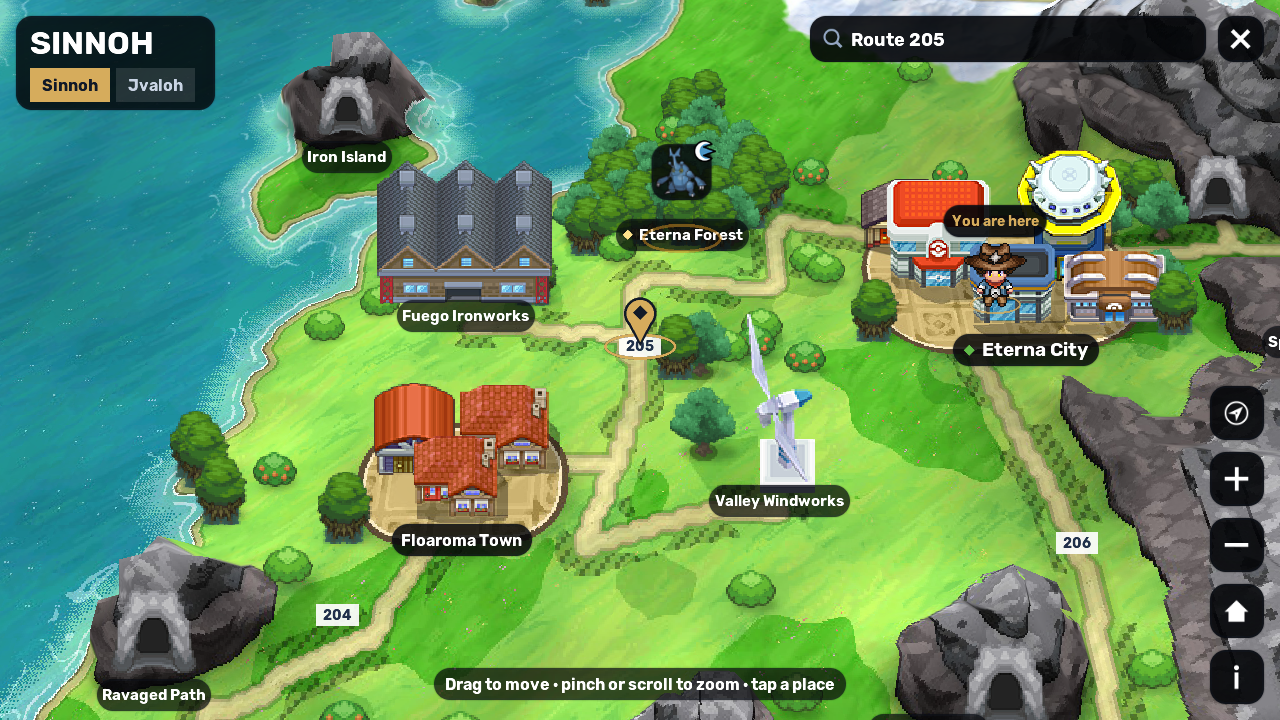
Section titled “The World Map”The game has its own map of each region. The World Map shows the region as a raised 2.5D board with its towns, routes, caves and landmarks. Click or tap any place to see what spawns there. The map also marks the Swarms and Lures running now.
Opening the World Map
Section titled “Opening the World Map”Press M, or the World Map button next to the map name. You need the Map item of the region you are in, such as the  Sinnoh Map; each region needs its own map lists who gives each one.
The map opens on your region, with your trainer marked You are here and the card of your place open. If you also hold other regions’ maps, their names appear as tabs under the region’s name: press one to look at that region. Sinnoh, Jvaloh, Hoenn and Kanto all have the map.
Moving around
Section titled “Moving around”| To | On a computer | On a phone |
|---|---|---|
| Move the map | Drag it, or press the arrow keys | Drag it |
| Zoom in or out | Scroll, or press + or − | Pinch |
| Zoom in on a spot | Double-click it | Double-tap it |
| Open a place’s card | Click it | Tap it |
| Close the map | Press M or Esc, or press the X | Press the X, or your phone’s Back button |
The round buttons in the bottom-right corner take you back to where you are, zoom in and out, show the whole region and open the legend of the map’s symbols.
The view tilts as you zoom. Far out, you see the whole region with the sky above its far coast; close in, you look down on the ground. City and town names show even from far out, while route numbers and the names of caves and landmarks appear as you zoom in. The map’s light follows server time, from morning to night.
To find a place, type its name in the search box at the top (Find a town, route or cave). It searches every region you can open. Pick a result, and the map flies there and opens its card.
What a place’s card shows
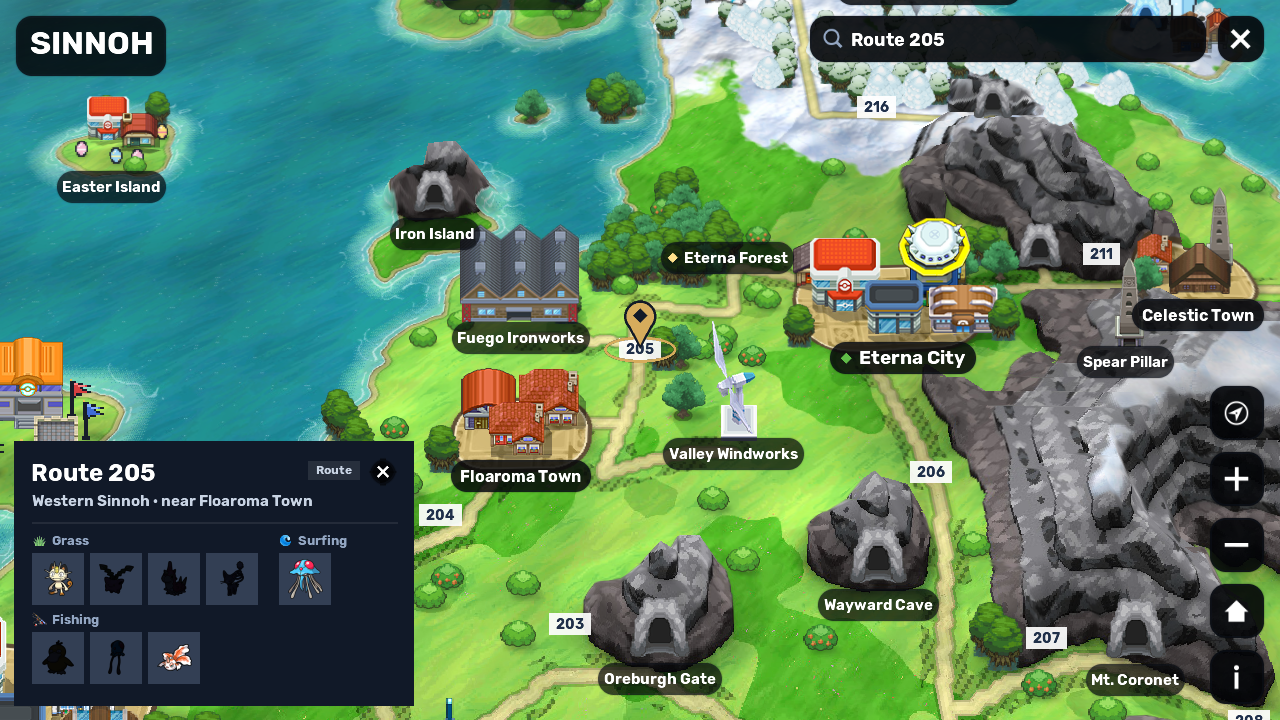
Section titled “What a place’s card shows”Click or tap a city, town, route, cave or landmark to open its card:
- its name and what it is, such as City, Route or Landmark
- where it is in the region, such as “North-west Sinnoh · near Eterna City”, or the two places a route joins
- the type of its Gym, if it has one; the gem on a city’s name shows it too
- other maps at the same spot, after Also here
- its wild Pokémon, grouped by how you meet them: grass, honey trees, surfing, fishing, headbutt trees and other
How the Pokémon show:
- A Pokémon you haven’t seen yet is a dark silhouette. During an event, its event Pokémon show as a question mark until you see them.
- A sun or a moon in the corner means it appears only by day or only by night.
- Level ranges show only for the place you are in.
The card doesn’t show rarity, EV yield or drops: the region pages above list them for every area. You can open the card of any place, even one you haven’t reached yet.
Swarms and Lures on the map
Section titled “Swarms and Lures on the map”The map also marks what is happening now. A running Swarm shows its Pokémon in a bubble over its map, and an active Lure shows a lure icon. Tap either one to see what it is and which map it is on.
Swarms
Section titled “Swarms”A Swarm is a timed map event: for 1 hour, extra wild Pokémon appear on one map. Each region has its own list of swarm Pokémon, and every Swarm brings some of them to its map. The bottom of each region page lists that region’s swarm Pokémon.
Some Pokémon only appear in the wild during Swarms, such as  Bagon,
  Deino and
  Sandile. If a Pokémon isn’t in any area table, check the swarm list.
- How they start: by themselves from time to time on a map in Sinnoh, Jvaloh or Hoenn, after a Dynamax Invasion ends, or when a player uses a
 Swarm Flute. In Kanto, only a Swarm Flute starts one.
 - How you hear about them: a message tells everyone when a Swarm starts, with its map and end time, and again when it ends. When you log in, a chat line says how many Swarms are active.
- Where to look: while a Swarm is running, the Swarms icon appears among the server-wide icons (see the game screen). Press it to see each Swarm’s map, Pokémon and time left. The World Map marks Swarm maps too.
- Longer Swarms: the player who started a Swarm with a Swarm Flute can extend it by another hour in its last 10 minutes.
Shiny hunting explains Swarm Flutes and how to reset or extend your own Swarm.