
Battle basics
Every battle in PBO uses the same screen, whether you meet a wild Pokémon, a trainer or another player. This page explains each part of it, what you win, how types and status conditions work, and how to heal. Catching has its own page: catching Pokémon.
The battle screen
Section titled “The battle screen”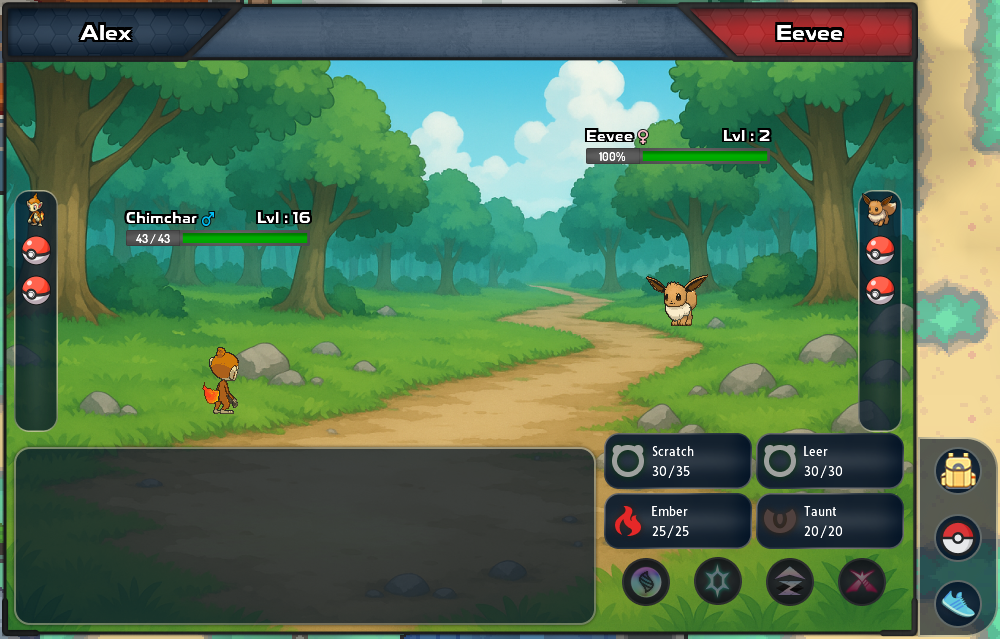
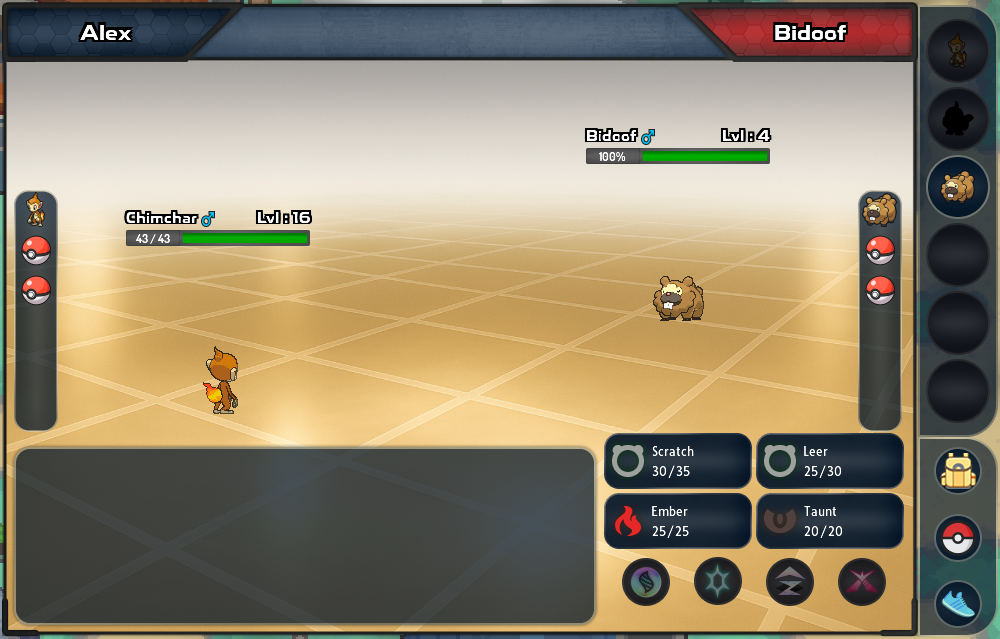
- Top: your name and your opponent’s are shown above the battle. Each side has a column of party icons, and each Pokémon has an HP bar. Yours shows exact HP; the opponent’s shows a percentage.
- Bottom left: the battle log says what happened each turn, such as “It’s super effective!”.
- Bottom right: your four moves sit here. Under them is a row of round buttons for special mechanics such as Mega Evolution.
- Far right: three buttons sit here. From top to bottom they are Bag (the backpack), Pokémon (the Poké Ball) and Run (the running shoe).
Bag and Pokémon open a panel beside the battle; press the button again to close it. The game remembers which panel you had open and opens it again in your next battle.
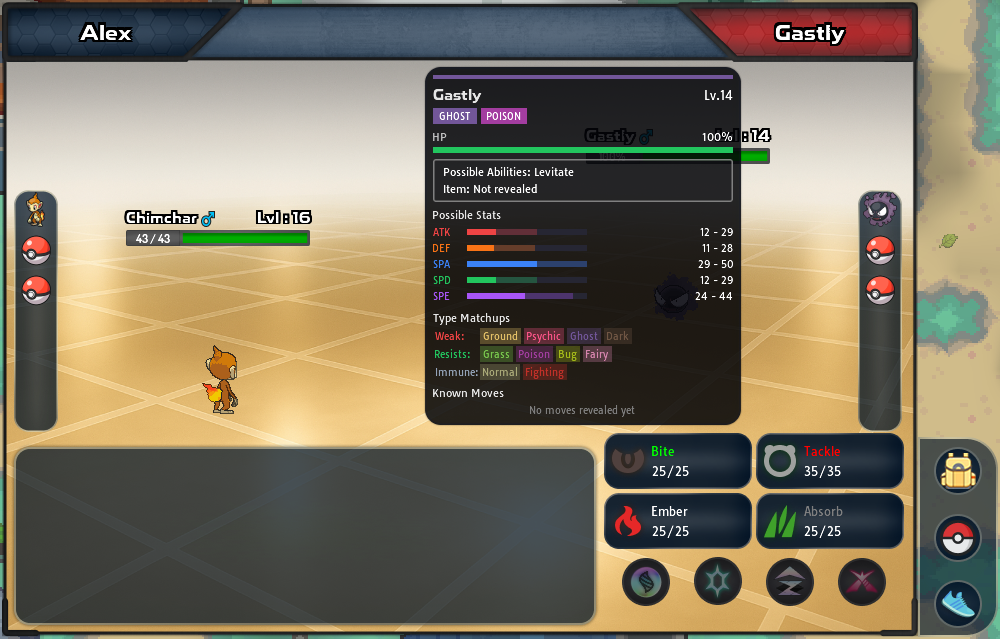
Hover over the opponent’s Pokémon (or touch and hold it on a phone) to open its card. It shows:
- its types, HP and possible abilities
- its held item, once the battle reveals it
- its likely stats
- Type Matchups: the types it is weak to, resists and is immune to
- the moves it has used so far
Your own Pokémon has a card too, with its stats, ability, item and moves.
Choosing a move
Section titled “Choosing a move”PBO has no Fight button: your four moves are always on screen. Click or tap one, or press 1–4 on a keyboard (see hotkeys). Each move button shows its type icon, name and PP.
- PP (power points) shows how many more times you can use the move, as “left / maximum”. A move at 0 PP can’t be chosen. When no move has PP left, your Pokémon uses Struggle.
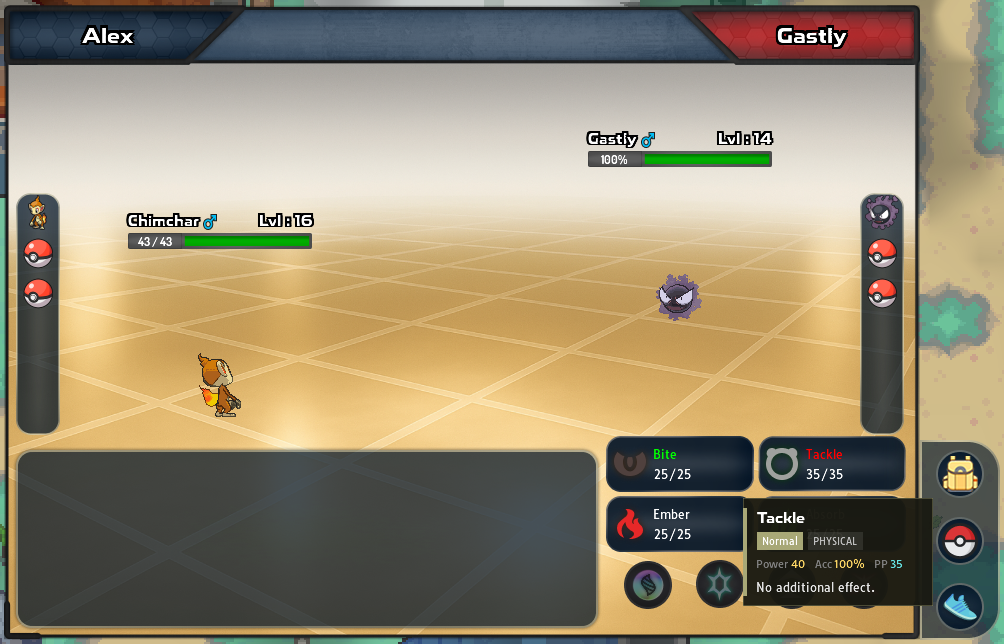
- Move details: hover over a move (or touch and hold it on a phone) to see its type, its category (Physical, Special or Status), Power, accuracy, PP and what it does.
- The colour of the name shows how well the move works against the opponent’s types:
| Name colour | Against this opponent |
|---|---|
| Green | Super effective |
| White | Normal damage |
| Grey | Not very effective |
| Red | No effect |
The colour only looks at types, so treat it as a guide. Status moves are coloured too, but most of them work whatever the types. An ability such as Levitate can also change the result. Types and effectiveness explains the words.
When your Pokémon in battle can Mega Evolve, the Mega Evolution button under your moves lights up. Press it, then choose a move. See Mega Stones.
In battles against other players and in co-op battles, a Cancel button lets you change your choice while you wait for the other side.
The Bag
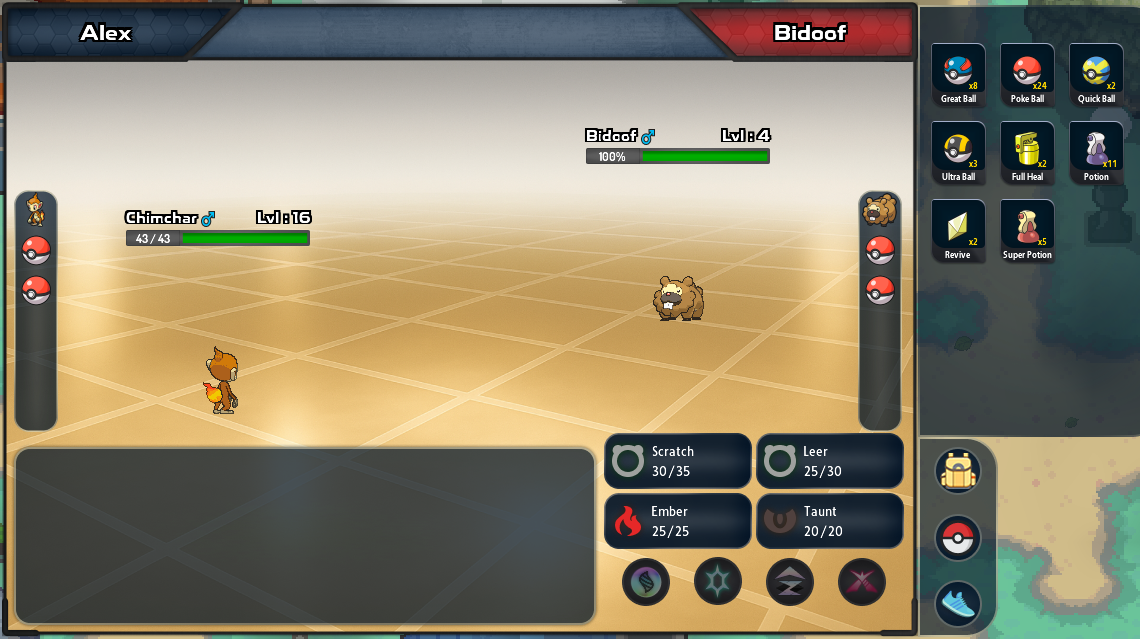
Section titled “The Bag”Bag shows your Poké Balls and Medicine items. Pick an item, then the Pokémon to use it on. Revives only work on fainted Pokémon, and other medicine only on Pokémon that haven’t fainted. Using an item takes your turn.
In wild battles you throw Poké Balls from here; see catching Pokémon.
- PP items:
 Ether,
  Max Ether,
  Elixir and
  Max Elixir can’t be used during a battle. Use them from your Bag afterwards.
 - Limits: some battles restrict the Bag. Revives are banned in Elite Four, Champion and Vs. Seeker battles, and Gym and Elite Four rematches allow no items at all.
Switching Pokémon
Section titled “Switching Pokémon”Press Pokémon to see your party, then pick the Pokémon to send out. Switching takes your turn, so the opponent still attacks. Hover over a party Pokémon (or touch and hold it) to check its HP, stats and moves before you choose.
- When your Pokémon faints, the party panel opens and you must pick the next one.
- Trapped Pokémon can’t switch out. Moves such as Mean Look and abilities such as Shadow Tag trap your Pokémon; the party buttons then turn grey.
Running and forfeiting
Section titled “Running and forfeiting”What Run does depends on the battle:
| Battle | What Run does |
|---|---|
| Wild | Tries to get away. It can fail. |
| Wild, in a Co-op Duo | Asks first, because running ends the battle for both of you. |
| Trainer | Forfeits after you confirm. It counts as a loss. |
| Another player | Forfeits after you confirm. It counts as a loss. |
| Crew Wars | Nothing: you can’t forfeit. |
Running from a wild Pokémon:
- Speed counts. You get away more easily when your Pokémon is faster than the wild one. Each failed try makes the next one easier, and the fourth try always works.
- Sure escapes. A Pokémon with the ability Run Away, or holding a
 Smoke Ball, always gets away.
 - Trapped Pokémon can’t run at all.
- When it fails, the log says “You cannot flee from this battle!” and the wild Pokémon gets a free turn.
On a computer, R runs from wild battles.
Turn timer
Section titled “Turn timer”Wild and trainer battles have no timer, so take your time. Battles you start from the Ladder window, and Crew Wars battles, are timed:
- Move Timer: your time to choose this turn.
- Battle Timer: your total thinking time for the whole battle.
Time spent waiting for your opponent doesn’t count. If either timer runs out while you are choosing, you forfeit.
A turn where you use almost all of your Move Timer counts as a stalling turn. After a few stalling turns, your Move Timer gets shorter. Challenges you send from another trainer’s menu are not timed.
Double battles and hordes
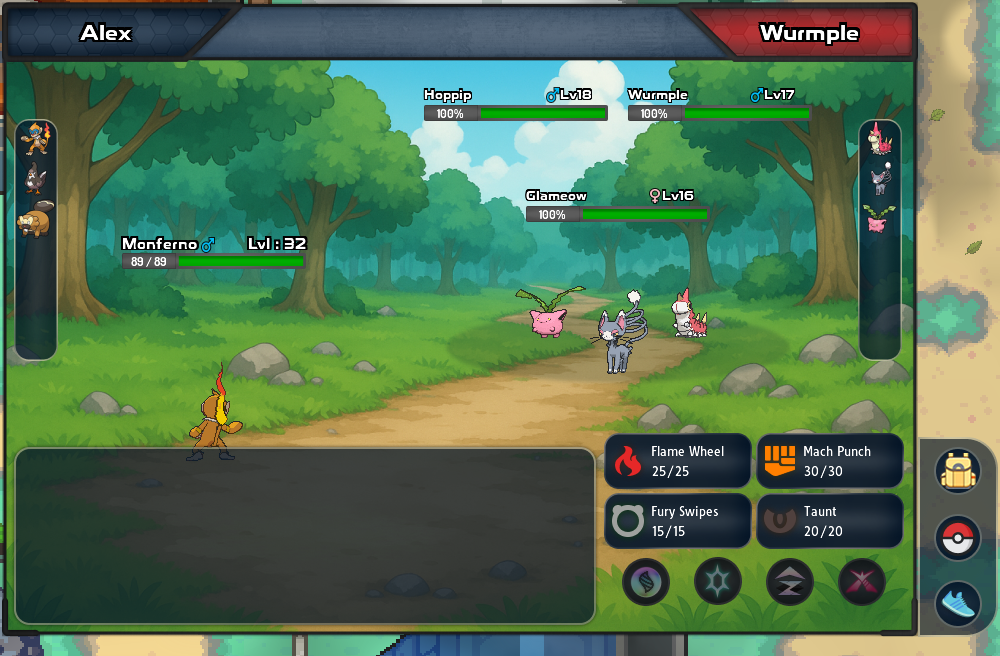
Section titled “Double battles and hordes”Some battles put two Pokémon on each side. After you choose a move, you also pick its target: a foe or your ally. In a horde, several wild Pokémon face your one Pokémon.
With a friend in a Co-op Duo, you share wild battles and many trainer battles. See co-op and hordes.
Wild, trainer and player battles
Section titled “Wild, trainer and player battles”Wild battles
Section titled “Wild battles”Wild Pokémon appear when you walk through grass or caves, surf, or fish.
- Experience: each of your Pokémon that took part and didn’t faint earns experience, and
 Exp. Share holders get a share. See who gets experience.
 - EVs: your Pokémon also earn EVs, which raise their stats. See EV training.
- Money: each wild Pokémon you defeat drops a little money, normally 1–5 F. See Pay Day and the Amulet Coin.
- Items: some wild Pokémon drop items. See wild drops.
The chat shows the money and experience you get. You can turn those messages off in Settings → General.
Trainer battles
Section titled “Trainer battles”- Starting: trainers on routes walk up to you when you pass in front of them, or battle you when you talk to them.
- Once only: route trainers battle you once. After you win, they only talk.
- Prize money: beating a route trainer pays a set amount, usually a few hundred to a couple of thousand F.
- Experience: after most trainer battles, every Pokémon in your party gains experience, even ones that didn’t battle.
- Losing: if you lose or forfeit, the trainer has the last word, then you black out.
Gym Leaders, the Elite Four and story bosses are trainer battles too. Their teams are in Gyms, Elite Four and Champions.
In Jvaloh, Hoenn and Kanto, Pokémon caught in an earlier region may battle at a lower level in wild and trainer battles. See levels in wild and NPC battles and level caps by badge count.
Rematching trainers
Section titled “Rematching trainers”Route trainers don’t rematch, but plenty of other trainers do:
- Vs. Seeker: rematch Ace Trainers in Sinnoh’s Pokémon Centers for money, Blaze Coins and items.
- Gym and Elite Four rematches: these open once you are a region’s Champion.
- Champion battles: battle the Champions again, at Easy, Medium or Hard.
- Daily trainer houses: two houses in Hoenn pay prize money once a day.
The Trainer Challenges icon in the top-right icon bar lists every repeatable battle and when it is ready.
Battles against other players
Section titled “Battles against other players”Click another trainer and choose Challenge for a friendly battle, or queue for one in the Ladder window. Battles against players give no experience or money; ranked battles have their own rewards. See ranked PvP.
Types and effectiveness
Section titled “Types and effectiveness”Every move has a type, and every Pokémon has one or two types. The move’s type against the defender’s types decides how much damage it does:
| Result | Damage | The log says |
|---|---|---|
| Super effective | ×2, or ×4 if both of the defender’s types are weak to it | It’s super effective! |
| Normal | ×1 | — |
| Not very effective | ×½, or ×¼ if both types resist it | It’s not very effective… |
| No effect | ×0 | It doesn’t affect … |
Some examples: Water moves are super effective against Fire Pokémon, and Fire moves are not very effective against Water Pokémon. Electric moves don’t affect Ground Pokémon, and Normal and Fighting moves don’t affect Ghost Pokémon. Every matchup is in the type chart.
STAB (same-type attack bonus): a move that shares a type with the Pokémon using it does 1.5 times the damage. A Fire-type  Chimchar gets the bonus on Ember but not on Scratch.
A move’s category decides which stats count. Physical moves use the attacker’s Attack and the target’s Defense; Special moves use Sp. Atk and Sp. Def. Status moves don’t deal damage. Natures and EVs shape these stats; see stats, IVs, EVs and natures.
Status conditions
Section titled “Status conditions”Some moves and abilities give a Pokémon a status condition. In battle, a small tag such as BRN shows it.
| Condition | Tag | What it does | Cure |
|---|---|---|---|
| Burn | BRN | Loses HP every turn, and its physical moves do half damage. |  Burn Heal Burn Heal |
| Paralysis | PAR | Its Speed is halved, and sometimes it can’t move. |  Paralyze Heal Paralyze Heal |
| Poison | PSN | Loses HP every turn. |  Antidote Antidote |
| Bad poison | TOX | Loses more HP every turn it stays poisoned. | Antidote |
| Sleep | SLP | Can’t move for a few turns. |  Awakening Awakening |
| Freeze | FRZ | Can’t move until it thaws. |  Ice Heal Ice Heal |
 Full Heal and
  Full Restore cure any of them, and so does a Pokémon Center.
In PBO, sleep wears off as soon as the battle ends. Every other condition, along with lost HP and PP, stays after the battle until you heal it.
Healing your team
Section titled “Healing your team”Pokémon Centers
Section titled “Pokémon Centers”Talk to the nurse at the counter of any Pokémon Center. She heals your whole team for free: HP, PP and status conditions. That Pokémon Center also becomes the one you return to when you black out.
Healing items
Section titled “Healing items”Use these from the Medicine tab of your Bag, or with the Bag button in battle. Poké Marts sell them, and stronger ones appear as you earn badges; see Poké Marts.
| Item | What it does |
|---|---|
 Potion Potion |
Restores 20 HP. |
 Super Potion Super Potion |
Restores 50 HP. |
 Hyper Potion Hyper Potion |
Restores 200 HP. |
 Max Potion Max Potion |
Restores all HP. |
| Full Restore |
Restores all HP and cures any status condition. |
 Revive Revive |
Revives a fainted Pokémon with half its HP. |
 Max Revive Max Revive |
Revives a fainted Pokémon with all its HP. |
| Ether and Max Ether |
Restore 10 PP, or all PP, to one move. Outside battle only. |
| Elixir and Max Elixir |
Restore 10 PP, or all PP, to every move. Outside battle only. |
The status cures are in status conditions.
Free healers outside Pokémon Centers
Section titled “Free healers outside Pokémon Centers”Many routes, forests and caves have someone who heals your team for free. Most are Aroma Ladies: talk to one and say yes. A few examples in Sinnoh:
 Aroma Lady Sulu in Eterna Forest
- Aroma Lady Kittu in Wayward Cave 2F, who also becomes your blackout point
- Aroma Lady Kanta in the Great Marsh
 Nurse Joy on Route 213, who also becomes your blackout point


Other regions have them too. On Jvaloh’s Champions Road, the Aroma Ladies in every section except #3 also become your blackout point when they heal you. Jvaloh also has a few healing objects, such as a stone tablet in Boulder Cavern and a healing pod in the Old Power Plant. See the Jvaloh walkthrough.
Some healers only help players with PBO Membership. They tell you so when you talk to them.
Fainting and blacking out
Section titled “Fainting and blacking out”A Pokémon at 0 HP has fainted. It can’t battle until you revive or heal it. You black out when your whole party has fainted, or when you lose or forfeit a trainer battle. When you black out:
- Where you go: you are sent to the last Pokémon Center where you healed, and your team is healed there. Until you first use one, you go back to your room in Twinleaf Town.
- Money: from your third Sinnoh badge on, you drop 1% of the money you carry, never more than 100 F. The chat tells you how much. Losing a wild battle and losing to most trainers cost the same; losing in the Battle Tower or Battle Frontier costs nothing.
In a Co-op Duo your partner can win a battle after your whole party has fainted. You are still sent to your Pokémon Center to heal.
Battle settings
Section titled “Battle settings”The Battle section of Settings → Gameplay changes how battles look and how fast they play:
- Show Catch Animation and Show Faint Animation (on by default): turn them off for quicker battles.
- Original Move Animation Speed (off by default): plays move animations in single battles at their full length. While it is off, long animations are shortened.
- Cinematic Doubles Pacing (on by default) and Cinematic Horde Pacing (off by default): add pauses and full-length animations to double battles and hordes. Turn them off for faster turns.
- Move effectiveness preview (multi-target) (on by default): in battles with several opponents, hovering a move shows how effective it is against each one.
- Enhanced Move Animations (blend modes) (on by default): adds blending effects to move animations.
Settings → Audio has a Battle volume slider and Disable Battle Music. See settings and performance.